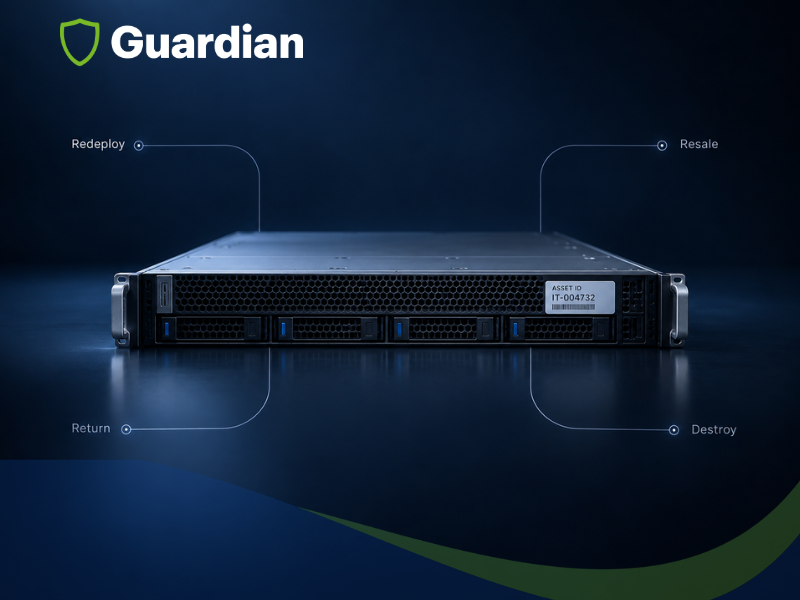
A hardware refresh has an obvious workstream: install the new equipment, confirm that users and systems can operate, and complete the rollout on schedule. The equipment coming out often receives less attention. It may be placed in a storage room, returned to a leasing company, transferred to another site, offered for resale, sent for recycling, or held while someone decides what to do next.
That delay creates more than clutter. Retired devices may still contain data, remain on financial or operational records, require lease return evidence, or lose recovery value while they wait. When multiple sites and service providers are involved, a weak exit plan can also create gaps between the source inventory, the assets physically removed, and the final records.
Direct answer: During an IT hardware refresh, every retired asset should receive an approved next step before it is removed. That may include redeployment, resale, lease return, storage, physical destruction, or recycling. The refresh plan should also define data sanitization, custody, packing, transportation, exception handling, and the evidence required to confirm final disposition.
The practical goal is simple: the incoming and outgoing sides of the refresh should be planned as one project. New equipment is not fully deployed if the retired equipment has no controlled destination.
This article provides operational guidance, not legal advice. Organizations should confirm their own privacy, security, records, environmental, contractual, and industry requirements with the teams responsible for those obligations.
Why the Exit Plan Belongs in the Refresh Scope
Refresh teams often measure success by installation milestones: devices delivered, systems configured, users migrated, and acceptance completed. Those measures are necessary, but they do not close the retired asset population. A complete refresh must also answer what left each location, whether the data was addressed, who received the equipment, and whether every exception reached an approved outcome.
The exit plan affects project sequencing. A device cannot be released for resale if the required sanitization has not been completed. A leased asset cannot be shredded if it must be returned intact. A failed drive should not be mixed with sanitized equipment. A rack, server, workstation, or network device should not be packed until the team knows whether it will be redeployed, returned, recovered for value, stored, destroyed, or recycled.
Planning principle: Assign the destination, sanitization decision, evidence requirement, and exception path before removal begins.
1. Establish the Retired Asset Baseline
The refresh list and the retirement list are related, but they are not always identical. One new device may replace several old devices. Some retired equipment may be reassigned within the organization. Additional drives, accessories, components, or devices may be found during removal. The project therefore needs a retirement baseline that can be reconciled independently from the deployment count.
The baseline should contain enough information to identify each asset, determine its handling requirements, and connect the physical device to the final record. Useful fields include:
- Asset tag, serial number, or another controlled identifier
- Manufacturer, model, device type, and media type when relevant
- Current site, room, rack, department, or user assignment
- Ownership status, including company-owned, leased, or customer-owned
- Data or security classification required by organizational policy
- Planned destination and disposition decision owner
- Condition, known defects, and dependencies such as rails, power supplies, or accessories
- Required date, site access window, and receiving location
The baseline should remain controlled as work occurs. Newly discovered assets, missing assets, unreadable identifiers, and duplicate records should be visible as exceptions rather than silently corrected after the event.
2. Assign an Approved Destination to Every Asset
A destination is a control decision, not a shipping label. It determines whether the asset must remain usable, whether physical alteration is permitted, which sanitization outcome is appropriate, how it should be packed, and what evidence will close the record.
| Planned outcome | Decision to confirm | Execution starting point | Closeout evidence |
| Redeploy | Approved next user, site, or workload. | Sanitize or reconfigure as policy requires; preserve usable condition. | Sanitization result, transfer, and new assignment. |
| Resale | Ownership, eligibility, expected value, and approved sales path. | Use an approved sanitization technique; grade and pack for recovery. | Device result, custody, sale or transfer, and reconciliation. |
| Lease return | Return terms, conditions, accessories, dates, and accepted evidence. | Keep the asset intact; complete the required sanitization and return preparation. | Sanitization result, packing record, carrier handoff, and return receipt. |
| Storage | Business reason, owner, duration, location, and review date. | Sanitize before storage when policy requires; control access and inventory. | Storage intake, location, custodian, and review status. |
| Destruction | Authorization, included media, required technique, and witness needs. | Segregate and process through the approved destruction workflow. | Serialized result, validation, exception closure, and final disposition. |
| Recycling | Reuse is not viable, and the downstream path is approved. | Address data first; separate batteries or regulated components as required. | Sanitization or destruction result, transfer, weight or receipt, and reconciliation. |
The U.S. Environmental Protection Agency notes that reuse can extend the useful life of electronics and recommends recycling when reuse or repair is not practical. Its guidance also points organizations toward certified electronics recyclers. The organization’s data security decision must be completed before equipment enters a reuse or recycling path. See the EPA electronics donation and recycling guidance.
3. Choose the Sanitization Path Before Assets Move
Data sanitization should be part of the disposition decision. Equipment intended for redeployment, resale, donation, or lease return may need to remain functional. Equipment with no approved reuse path may be eligible for physical destruction. The correct choice depends on the media, data sensitivity, intended destination, device condition, organizational policy, and applicable requirements.
NIST Special Publication 800 88 Revision 2 provides a risk-based framework for media sanitization. It describes clear, purge, and destroy methods and emphasizes selecting an appropriate technique, verifying that the technique completed successfully, validating that the outcome is acceptable, and documenting the result.
Onsite processing can reduce the period in which unsanitized media is transported or transferred to another party. It can also allow the team to decide immediately what happens when a device cannot complete the approved erasure technique. Onsite service does not create compliance by itself. The result still depends on accurate identification, appropriate technique selection, controlled custody, verification, validation, exception closure, and records.
For a detailed comparison of the method decision, use Guardian’s guide to onsite data erasure versus shredding for audit compliance. The refresh plan only needs to record the approved path for each population and define how exceptions will be handled.
Decision rule: Preserve function only when there is an approved next use or return requirement. Do not preserve a device by default when the data, condition, cost, or destination does not support reuse.
4. Create a Controlled Exception Path
Exceptions are expected in a refresh. Drives fail. Devices remain locked. Identifiers do not match. Equipment appears that was not in the original list. A system may contain embedded storage that the project scope did not describe. The control failure occurs when the team improvises after discovering the exception.
Every exception should receive a status, custodian, physical location, decision owner, next action, and closure record. A practical workflow is
1. Stop the standard path: Do not release, return, resell, recycle, or mix the asset with completed equipment while its status is unresolved.
2. Identify the exception: Record the device identifier, site, media type, observed condition, attempted method, result, and current custodian.
3. Apply an approved alternate path: The next step may be another supported sanitization technique, repair for controlled processing, physical destruction, return to the asset owner, or a documented hold.
4. Validate the outcome: An authorized person should confirm that the final result is acceptable for the data sensitivity and destination.
5. Reconcile the baseline: Close the exception against the original asset record so the final project totals remain defensible.
Common exception evidence: Asset identifier, original destination, issue found, attempted action, custody status, approved alternate method, validator, completion date, and final disposition.
5. Coordinate Deployment Removal Packing and Transportation
A refresh is easiest to control when deployment and retirement teams share one sequence. The new device must be ready at the right location, the old device must be released by an authorized owner, and the retired equipment must enter the correct handling stream without blocking users or creating an uncontrolled staging area.
The site plan should define:
- The approved change, shutdown, user, or system release point
- Who disconnects, removes, and verifies each equipment type
- How incoming and outgoing equipment will be separated
- Where retired assets will be staged and who may access the area
- When sanitization or media removal will occur
- Packing standards by device type, condition, and destination
- Labels that identify the destination without exposing unnecessary sensitive information
- Carrier, vehicle, route, receiving contact, transfer record, and delivery window
- Receiving reconciliation and the process for shortages, overages, or damage
Packing and transportation should reflect the value, fragility, and destination of the equipment. Guardian’s guide on choosing a data center logistics provider explains why packing, custody, carrier qualification, reconciliation, and exception management belong in the scope rather than being left as assumptions.
6. Define Responsibility Across the Project
Hardware refreshes often involve the customer, a VAR or MSP, deployment technicians, an ITAD provider, a data destruction team, a carrier, a leasing company, a recycler, and one or more receiving sites. A detailed scope should assign decisions and outputs, not just list vendors.
| Workstream | Decision owner | Execution owner | Required output |
| Refresh scope | Customer program owner | VAR, MSP, or program lead | Sites, quantities, schedule, dependencies, and acceptance criteria. |
| Asset release | Customer asset or system owner | Authorized site contact | Approved release and source baseline. |
| Sanitization policy | Customer security or compliance owner | Approved service team | Method criteria, results, validation, and exceptions. |
| Removal and staging | Project lead and site owner | Qualified field team | Removed population, staged location, and discrepancies. |
| Packing and transport | Project or logistics owner | Packing team and qualified carrier | Packing record, custody transfer, and delivery confirmation. |
| Final disposition | Customer asset disposition owner | Approved downstream provider | Receipt, resale, return, destruction, recycling, or storage evidence. |
| Project closeout | Customer program owner | Program coordinator | Reconciled totals, open issues, evidence package, and acceptance |
The same company may perform several workstreams, but ownership should still be explicit. When a partner leads the customer relationship, the field execution and reporting model should support that structure rather than create a separate customer experience.
7. Define the Evidence Before Work Begins
A refresh should produce an evidence package that answers what was planned, what was found, what happened, and what remains open. The required fields should be agreed upon before technicians arrive. Trying to reconstruct device-level records after equipment has been transported, mixed, or processed is slower and less reliable.
| Evidence area | Question the record should answer |
| Authorized scope | Which sites, asset populations, dates, and services were approved? |
| Source baseline | Which assets were expected, and how was each one identified? |
| Physical result | Which assets were removed, left in place, missing, extra, damaged, or otherwise excepted? |
| Sanitization | Which method and technique were used, whether they were completed, and who validated the outcome? |
| Custody | Who controlled the equipment at each required transfer and location? |
| Transportation | What was shipped, how was it packed, which carrier received it, and where was it delivered? |
| Destination | Which assets were redeployed, sold, returned, stored, destroyed, or recycled? |
| Exceptions | What did not follow the standard path? Who owned the issue, and how was it closed? |
| Reconciliation | Do planned, found, processed, delivered, excepted, and final totals agree? |
The FTC Disposal Rule requires covered businesses and individuals that possess consumer report information for a business purpose to take appropriate measures when disposing of that information. It is one example of why a refresh plan should connect data handling and equipment disposition rather than treat them as separate administrative tasks.
Hardware Refresh Disposition Matrix
A simple matrix can prevent late decisions. Complete it for each asset population before scheduling removal.
| Asset population | Owner and destination | Sanitization path | Handling and logistics | Evidence and exception |
| User devices | Redeploy, resale, lease return, or recycle. | Approved technique by media and destination. | User release, accessory match, protective packing, receiving list. | Device result, custody, delivery, missing accessories, failed media. |
| Servers and storage | Redeploy, resale, return, destroy, or recycle. | System release plus media specific technique. | Rack removal, rails and components, anti-static protection, and serialized packing. | Serials, media results, cable or component exceptions, receipt. |
| Network equipment | Redeploy, resale, return, or recycle. | Configuration and embedded media decision. | Port protection, accessories, rack hardware, and labeled destination. | Configuration clearance, serial, transfer, missing components. |
| Failed devices or media | Destroy, approved repair path, or owner return. | Controlled alternate technique or destruction. | Segregated container and restricted custody. | Failure reason, approved alternate action, validation, and final disposition. |
| Unlisted equipment | Hold until ownership and destination are approved. | Do not assume the same path as listed assets. | Separate staging with controlled access. | Discovery record, owner decision, added scope, final reconciliation. |
A Refresh Project in Practice
In a Guardian university IT refresh project, the program covered 750 workstations across several campuses. The work combined removal of legacy units, onsite data sanitization, deployment of new workstations, packing and transportation of retired equipment, and device-level certification. The example is useful because it treats deployment and disposition as connected field activities rather than separate projects.
The broader lesson is not that every refresh should use the same workflow. It is that the old equipment path must be designed with the same care as the new equipment rollout. Site access, user disruption, data handling, asset identity, packing, destination, and evidence all depend on the sequence.
How Guardian Supports Hardware Refresh Programs
Guardian supports VARs, MSPs, ITADs, OEMs, and enterprise infrastructure teams with the physical execution required during hardware refresh programs. The scope can cover a single facility or a coordinated multisite rollout, with services selected according to the partner’s program design and the customer’s approved policies.
- Preproject scoping by site, asset population, schedule, access, and destination
- Deinstallation, removal, serialized verification, and reconciliation
- Onsite data erasure for eligible devices and approved project populations
- Onsite physical destruction for authorized media
- Controlled routing for failed, unsupported, or otherwise excepted devices
- Packing, labeling, staging, and transportation coordination
- Deployment support when installation is included in the refresh scope
- Centralized coordination and project reporting for single site and multisite programs
For partner-led programs, Guardian’s execution model supports the existing customer relationship. The partner can retain program ownership while Guardian coordinates the agreed field services and evidence package.
IT Hardware Refresh Checklist
Use this checklist before authorizing removal of retired equipment.
- Confirm the refresh scope, sites, quantities, dates, and acceptance criteria
- Create a retired asset baseline separate from the deployment count
- Confirm ownership and lease status for every asset population
- Assign an approved destination to every asset or defined population
- Approve the sanitization method and technique by media, sensitivity, and destination
- Define onsite processing, transfer, or transportation custody boundaries
- Create a controlled path for failed, unsupported, locked, damaged, missing, and extra assets
- Set removal, staging, packing, labeling, and carrier requirements
- Confirm receiving contacts, delivery windows, and reconciliation procedures
- Define the evidence fields and the authorized validator before work begins
- Reconcile planned, found, processed, shipped, delivered, excepted, and final totals
- Close every exception and record the final disposition
Frequently Asked Questions
What Should Happen to Old IT Equipment During a Hardware Refresh?
Each asset should be assigned an approved destination before removal. Common outcomes include internal redeployment, resale, lease return, controlled storage, physical destruction, and recycling. The plan should connect that destination to data sanitization, physical handling, custody, evidence, and an exception path.
When Should Retired Equipment Planning Begin?
Planning should begin when the refresh scope is approved. Early decisions affect contracts, field staffing, staging space, sanitization capacity, packing materials, carrier scheduling, lease dates, downstream providers, and reporting requirements.
Should Data Sanitization Happen Before Equipment Leaves the Site?
It depends on policy, media, destination, site constraints, and the approved custody model. Onsite sanitization can reduce the time that unsanitized media spends in transit or another party’s custody. If processing occurs later, the plan should define secure handling, transfer records, transport, storage, access, and exception control until the approved result is complete.
Can Retired Equipment Be Erased and Resold?
Yes, when ownership permits resale, the equipment has a viable recovery path, and an approved sanitization technique can be completed, verified, validated, and documented. The expected recovery value should be considered together with processing, testing, packing, transportation, and exception costs.
What Happens When a Drive Cannot Be Erased?
The drive should remain controlled and be recorded as an exception. The team should use an approved alternate path, often physical destruction when reuse is no longer required, then record the validation decision and final disposition against the original asset.
What Documentation Should a Refresh Produce?
The evidence package should include the authorized scope, source inventory, physical findings, sanitization results, validation decisions, custody transfers, packing or shipment records, receiving confirmation, exception closure, final disposition, and project reconciliation. Required fields and retention periods should be defined by the organization before work begins.
Who Should Pack and Transport Retired Equipment?
The work should be assigned to teams qualified for the equipment, destination, site, and risk. The scope should define packing materials, handling requirements, labels, carrier qualifications, custody transfers, insurance expectations, receiving procedures, and accountability for damage or discrepancies.
Can One Provider Coordinate Deployment and Retirement?
Yes, when the scope, responsibilities, site sequence, technical boundaries, sanitization rules, logistics, reporting, and exception ownership are clear. A coordinated provider model can reduce handoff gaps, but the customer and channel partner should still retain explicit decision ownership and acceptance criteria.
Plan the Equipment Coming Out Before the New Equipment Goes In.
A hardware refresh is not complete when the replacement devices are installed. It is complete when the retired population is accounted for, data risk is addressed, every asset reaches an approved destination, exceptions are closed, and the evidence agrees with the physical outcome.
To scope a hardware refresh support project, share the site or sites, estimated quantities, device and media types, ownership or lease status, deployment schedule, intended destinations, sanitization requirements, access conditions, packing and transportation needs, and required reporting fields.
Plan your next hardware refresh project with Guardian.
Sources
- NIST Special Publication 800 88 Revision 2 Guidelines for Media Sanitization
- Federal Trade Commission Disposal of Consumer Report Information and Records
U.S. Environmental Protection Agency Electronics Donation and Recycling